

Preparing for a technical iOS job interview with questions and answers in 2025 - book preview
An updated book version with a new chapter on Architecture & Design Patterns is now available.
07 Jan 2025 · 8 min read


I just released a new book version of Preparing for a technical iOS job interview - with over 200 questions & answers including a new chapter on Architecture & Design Patterns.
This preview provides one example question and answer for every main chapter of the book. You can also download a preview here to see the full outline of the book.


Introduction
Having been a freelance iOS developer for over 10 years, I participated in quite a few hiring interviews for various projects and have also been in a position of leading the technical interviews myself.
With this book, I'd like to give you a guide for technical iOS questions you might be asked in such an interview for an iOS hiring position. It can also be used to get an overview on different iOS development topics and be an inspiration for deepening and expanding your knowledge on your iOS journey.
Each chapter starts with a questions overview that allows you to check your knowledge without seeing the answers. All questions are numerated so you can quickly find the answer if needed. The following topics are covered:
Chapter: Swift
Being the main programming language for the iOS platform, a deep knowledge in Swift is expected from an iOS developer. This chapter provides questions and answers on Swift and general programming language concepts.
Example question & answer:
Swift is a type-safe language. What does type safety mean, and why is it important?
Type safety means that the compiler enforces rules to prevent type errors by ensuring values are used consistently with their declared types. For example, if we declare a variable as an Int, we cannot assign a String value to it. The compiler checks for type mismatches during compilation and provides errors, helping developers catch and fix issues early in the development process.
This feature improves code reliability and reduces runtime errors because many potential bugs are identified before the app runs. Type safety also enhances code readability and maintainability, as the expected data types are clear from the code.
var age: Int = 10age = "ten" // Compiler error: Cannot assign a value of type 'String' to a variable of type 'Int'
By enforcing type safety, Swift encourages robust and predictable programming practices, making code safer and easier to debug.
Chapter: SwiftUI
SwiftUI is Apple's main framework for building user interfaces for iOS. This chapter provides questions and answers on the main aspects of SwiftUI.
Example question & answer
Why is it advisable to avoid using AnyView in SwiftUI when possible?
SwiftUI uses a concept called structural identity, where it relies on a view's type to efficiently determine when the view should be updated.
AnyView is a type-erased wrapper that can hold any SwiftUI view. However, since it erases the view's type information, it diminishes SwiftUI's ability to efficiently track and update the view. This can lead to reduced performance, especially in complex view hierarchies.
Therefore, it is advisable to avoid using AnyView whenever possible to maintain the performance benefits of SwiftUI's structural identity.
Chapter: Xcode
Being the main iOS development tool, a confident usage of Xcode is expected from an iOS developer. This chapter provides questions and answers on working and debugging with Xcode.
Example question & answer
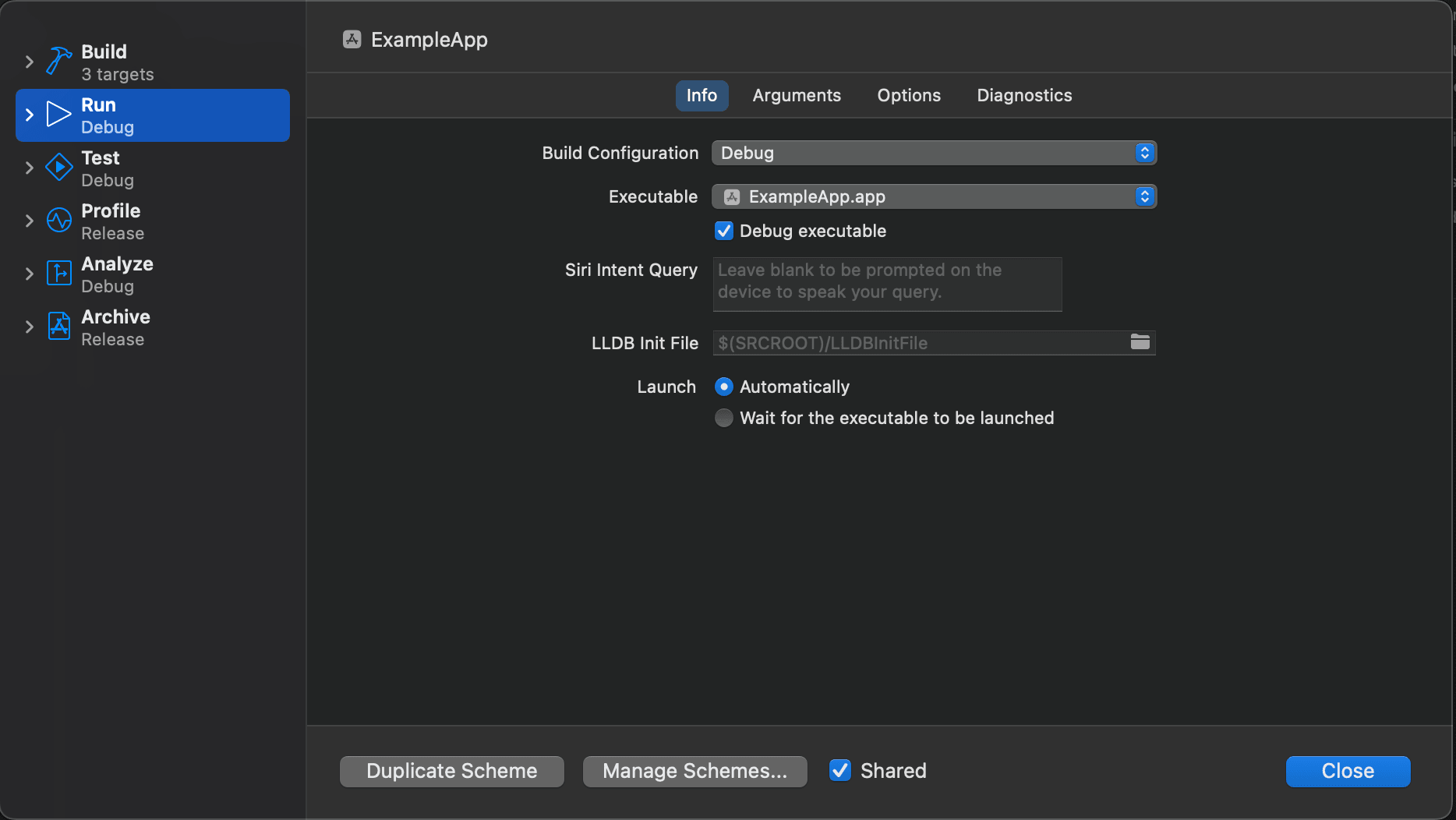
What is the purpose of a build scheme in Xcode?
An Xcode build scheme organizes the settings and configurations for development actions such as building, running, testing, profiling, and archiving a project. A scheme determines which targets to build and how they are built, allowing developers to manage workflows efficiently.
Only one scheme can be active at a time. Developers can customize default schemes or create new ones to handle specific tasks, such as creating different builds (e.g., debug or release) or passing unique launch arguments for testing.
Chapter: Combine
The Combine framework is Apple’s native solution for handling asynchronous events and data streams in Swift. It enables developers to write functional reactive code, streamlining tasks like chaining, transforming, and combining data. This chapter provides questions and answers on Combine and on functional reactive programming concepts in general.
Example question & answer
What is the difference between a subject and a publisher in Combine?
In Combine, a publisher emits values over time and can finish or fail with an error. A subject is a type of mutable publisher, meaning it can actively send new values after its initialization.
Essentially, subjects are a way to manually control the flow of values in a publisher, whereas regular publishers emit values automatically based on their data source.
Chapter: Server Communication
Server communication is part of almost every iOS application. This chapter provides questions and answers on general computer networking concepts and on specific iOS networking topics.
Example question & answer
What is OAuth, and why is it used?
OAuth is an open protocol for secure authorization, allowing users to grant third-party services limited access to their resources without sharing credentials.
The core idea is the use of access tokens as intermediaries. When a third-party app requests access to a user's resources, it obtains an access token from the main service through a secure flow. This token grants limited permissions, ensuring:
- The user's credentials (e.g., password) remain private and are not shared with the third party.
- Access can be revoked at any time without affecting the user's main account.
OAuth enhances security and user control over data sharing across applications and services.
Chapter: Concurrency
This chapter focuses on Swift's concurrency model with async/await. It also provides questions and answers on more low-level technologies like Grand Central Dispatch and Operations. Since they were used in iOS applications before async/await, knowledge around these technologies may be required for an iOS position.
Example question & answer
What is the role of the await keyword in Swift's asynchronous programming?
TThe await keyword in Swift enables asynchronous functions to suspend execution until the result of another asynchronous function or task becomes available. This allows developers to write asynchronous code in a sequential and readable manner while the system manages underlying complexities, such as pausing and resuming execution. By combining async and await, Swift ensures clarity and efficiency in handling concurrent operations.
Chapter: Persisting Data
Persisting pieces of data is required in many applications. Apple offers solutions to store data for different scenarios. This chapter contains questions and answers on persistence technologies and frameworks such as File System, UserDefaults, SwiftData and Core Data.
Example question & answer
What is migration in SwiftData, and how does it handle schema changes?
Migration in SwiftData ensures that changes to data models in new app versions do not lead to data loss. SwiftData handles this by transitioning between schema versions through migration plans. Developers can define versioned schemas, specify migration sequences, and choose between lightweight migrations or custom transformations as needed.
This process helps maintain data integrity while evolving the app's data structure.
Chapter: Security
Many applications need to manage some kind of sensitive user data. To ensure a high level of security, Apple provides different technologies to be used by developers. This chapter provides questions and answers on specific security-related iOS technologies such as keychain or shared web credentials, as well as general cryptography concepts.
Example question & answer
What are use cases of a hash function?
Cryptographic hash functions have various security applications, such as:
- Digital Signatures: Ensuring the integrity of signed data.
- Message Authentication: Verifying the authenticity of messages.
- Password Verification: Protecting stored passwords.
For instance, in password verification, instead of storing plain passwords, the server stores their hash values. When a user logs in, the app hashes the entered password and sends it for comparison. This approach ensures that the original password is neither stored nor transmitted, enhancing security.
Chapter: Architecture & Design Patterns
Architectural principles and design patterns are the foundation of robust, maintainable, and scalable iOS applications. This chapter explores key architectural concepts and widely used design patterns in iOS development, providing practical examples and insights into their strengths and weaknesses.
Example question & answer
What are the strengths and weaknesses of the MVVM pattern in iOS development?
The MVVM pattern in iOS development separates UI concerns from business logic by introducing a ViewModel that acts as an intermediary between the Model and View.
This structure makes code more maintainable, testable, and reusable, as it reduces tight coupling between components. MVVM aligns particularly well with SwiftUI’s declarative nature, where state management and bindings are core features.
However, it can add complexity and require additional boilerplate, particularly in small or simple apps where the benefits may not outweigh the costs. MVVM is most effective in medium-to-large applications with more intricate UI and logic, where clear separation of concerns is crucial.
Chapter: Automated Testing
Testing is an important part in every software development process. Apple offers tools to write unit, UI and performance tests for iOS applications. This chapter provides questions and answers on general testing concepts and specific iOS testing tools.
Example question & answer
What are parameterized tests when working with Swift Testing?
Swift Testing supports parameterized tests allowing us to run the same test logic multiple times with different input values:
@Test(arguments: ["a", "b", "c"])func example(input: String) {...}
Machine Learning
Machine learning becomes an increasingly important part of software development and engineering jobs. Machine learning techniques are used to build models that can learn patterns in data and make predictions or decisions without being explicitly programmed to do so. These models are used in a variety of applications, including image and speech recognition, natural language processing and recommendation systems. This chapter provides questions and answers on general machine learning concepts and on how to integrate machine learning into an iOS application.
Example question & answer
What are some examples of tasks than can be solved with the Natural Language framework out of the box?
The Natural Language framework is a machine learning framework that allows us to process and analyze natural language text. With the Natural Language framework, we can solve a wide range of natural language processing tasks, for example:
- recognizing the language of a text
- finding synonyms or similar sentences of a given text
- identify and extract named entities from text, such as people, organizations, and locations
- part-of-speech tagging, i.e. tagging each word in a piece of text with its part of speech, such as noun, verb, adjective, etc.
Working with Legacy Code: UIKit
With SwiftUI slowly pushing UIKit into the background, UIKit is still part of many existing iOS applications. A deep knowledge of UIKit may be required for an iOS position. This chapter provides questions and answers around key aspects of UIKit.
Example question & answer
What is the concept behind intrinsic content size of a UIView?
Intrinsic content size represents the amount of space a view needs to display its content. A view can have an intrinsic content height, width or both.
For example, the intrinsic content size of a UILabel will be the size of the text it contains.
Not all views have an intrinsic content size. When defining a custom view, we are able to decide if it has an intrinsic content size depending on how we setup the view's constraints.
Working with Legacy Code: Objective-C
Objective-C is becoming more and more obsolete after Swift was released in 2014. However, with existing apps written in Objective-C still out there, knowledge on Objective-C may be required for an iOS position. This chapter provides questions and answers on Objective-C basics and the interoperability between Swift and Objective-C.
Example question & answer
What is an implementation file in Objective-C?
An implementation file contains the actual implementation for an Objective-C class. It implements all methods defined in the header file and also contains private properties and methods.
The syntax to declare a class implementation looks as follows:
SomeClass.m
#import "SomeClass.h"@implementation SomeClass// implement public methods// define & implement private properties and methods@end
This article is a preview of the book Preparing for a technical iOS job interview - with over 200 questions & answers.


Newsletter


Like to support my work?


Say hi
Related tags
Articles with related topics
Latest articles and tips